Making Purchases in Oracle Procurement
In Oracle Financials, navigate to Procure to Pay > Purchase Requisition to access the supplier catalogs and use the appropriate request forms described below.

| Type | When to Use |
|---|---|
| Punchout Catalogs | Use this option to expedite purchases and payments. UC or UC Riverside has negotiated price discounts and preferential service terms with these suppliers. |
| Non Catalog Requisition < $10K for Goods and Services | Use for goods or services totaling $10,000 or less, excluding taxes and additional charges. Requisitions over this limit will be automatically rejected. |
| Non Catalog Requisition > $10K for Goods and Services | Use for goods or services totaling more than $10,000. These requisitions will route to a professional buyer for review and approval. |
| Non Catalog Requisition for Lump Sum Purchases | Use for lump sum purchases (also known as a blanket PO) not exceeding one year. Ideal for multiple shipments, invoices, or recurring services. |
Critical Processing Details
-
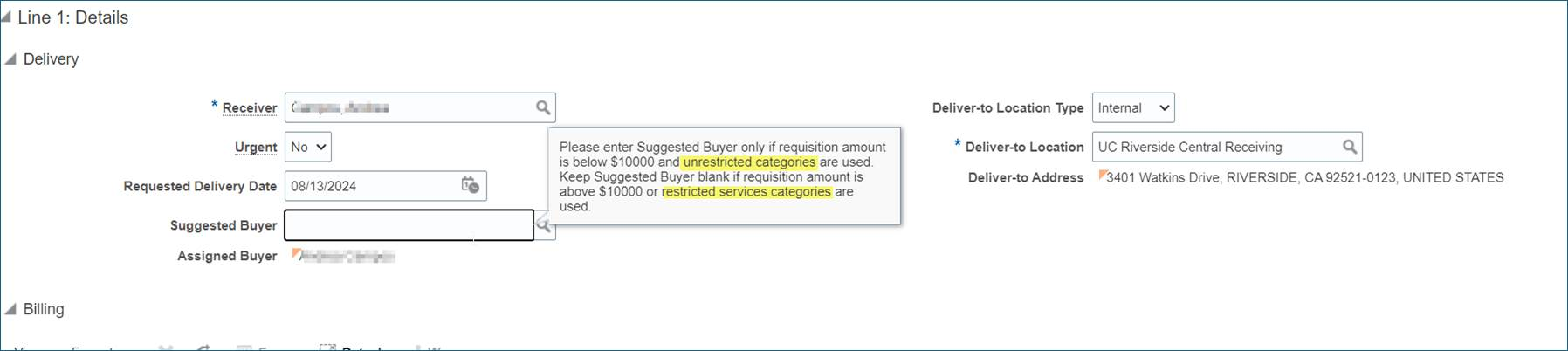
For punchout catalog purchase orders (POs), departments are required to enter a name in the “Suggested Buyer” field. This name should reflect the department transactor responsible for submitting or approving the requisition. The field should not be left blank. If it is omitted, departments will be asked to update the purchase order before it can be processed. This requirement applies specifically to punchout (catalog) orders and does not apply to non-catalog requisitions, where it may be appropriate to leave the field blank. When the "Suggested Buyer" field is left blank, the system defaults to assigning a central procurement buyer’s name to the PO. This creates confusion, as it may appear that the central buyer initiated the order. A technical fix is not currently possible, so manual entry by departments remains necessary. Departments should also keep in mind that punchout purchases are limited to $10,000 or less and must comply with established procurement thresholds and policies.
-
Avoid PO Rejections on Orders Over $10K. To ensure compliance with procurement policies, all purchase orders (POs) over $10,000 must be routed to a procurement services buyer for approval. The safeguard helps maintain policy adherence and supplier agreements. However, some departments inadvertently bypass this process by manually updating the buyer field to their name. When this happens, central procurement must reject the PO, leading to delays and extra work. To prevent rejections: Do not change the buyer field on requisitions over $10K—the system will assign the correct procurement buyer automatically. If a PO over $10K is rejected, check the buyer field and correct it before resubmitting.
-
The Non-Catalog Requisition for Lump Sum Purchases form is the preferred option for structuring purchase orders (POs) that require multiple payments. Be sure to indicate the payment schedule in the item description—for example, monthly or quarterly. If you used the Non-Catalog Requisition for Goods and Services under $10K and multiple payments are needed, adjust the quantity and unit price to reflect the number and value of expected payments. If the PO is left at the default “1 each,” Oracle will assume payment is complete after the first invoice, which will block any additional payments unless a change order is submitted. For example, when a purchase order is created with “1 each,” Oracle treats the first payment as the final one. Any future invoices will be rejected unless the PO is modified.

-
Leave the Buyer Field Blank on Service Requisitions. When creating service requisitions, the Suggested Buyer field must be left blank for any service purchases, regardless of the dollar amount. This applies even if the amount is under $10K. Services are treated as restricted categories requiring procurement services buyer review, and it is crucial to adhere to this guideline. Help text appears on requisitions indicating when to leave the buyer field blank to assist you.